Your Essential Guide to Downloading BeamNG.drive Now
Key Takeaways
- BeamNG.drive features cutting-edge graphics and realistic physics.
- Available on multiple platforms including PC and consoles.
- Simple installation process ensures quick access to gameplay.
- Experience dynamic environments and improved UI in the latest update.
- Popular in the Southeast Asian gaming community, particularly in Indonesia.
Overview of BeamNG.drive
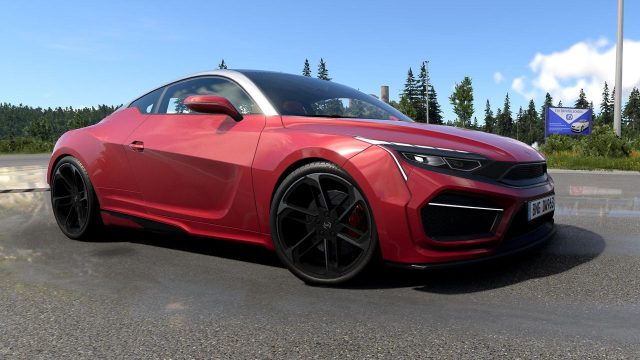
BeamNG.drive has carved a niche for itself in the realm of racing simulators, offering players a unique blend of realism and creativity. With its latest graphics overhaul, the game showcases improved visual fidelity, including dynamic ambient lighting that makes every scene immersive. Players can witness the physics engine at work as they navigate various terrains, making even the simplest tasks like driving a family hatchback feel exhilarating. This unique approach not only enhances the gaming experience but also draws in a dedicated community that thrives on customization and exploration.
Platform Availability
BeamNG.drive is primarily available on Windows platforms via the official Steam store. It can be accessed on the following platforms:
- Steam
- Check for updates on the official BeamNG website
While there is currently no console version directly available, fans are hopeful for future announcements given the game’s popularity within the racing genre.
System Requirements
Before downloading BeamNG.drive, it’s important to ensure your system meets the necessary requirements for optimal gameplay. Below are the recommended and minimum specifications:
Minimum Requirements
- OS: Windows 7 64-bit
- Processor: Dual-core CPU 2.5 GHz
- Memory: 4 GB RAM
- Graphics: NVIDIA GeForce 660 or equivalent
- DirectX: Version 11
- Storage: 20 GB available space
Recommended Requirements
- OS: Windows 10 64-bit
- Processor: Quad-core CPU 3.0 GHz
- Memory: 8 GB RAM
- Graphics: NVIDIA GeForce GTX 970 or equivalent
- DirectX: Version 11
- Storage: 20 GB available space
How to Download BeamNG.drive
Downloading BeamNG.drive is a straightforward process. Follow these steps to get started:
For Steam Users
- Open the Steam application on your device or download it from the Steam website.
- Create a new account or log in to your existing account.
- Use the search bar to type in "BeamNG.drive".
- Select the game from the search results and click on the "Add to Cart" button.
- Proceed to checkout by clicking on your cart and then select "Purchase".
- Once the purchase is complete, the game will automatically begin downloading.
- After the download is complete, you can launch BeamNG.drive from your Library.
For Future Console Availability
While BeamNG.drive is not currently available on consoles, players should keep an eye on announcements for potential releases on platforms such as PlayStation or Xbox. Follow relevant gaming news outlets to stay informed.
Conclusion
BeamNG.drive continues to push the envelope in racing simulation through its realistic gameplay and stunning graphics. Now is an exciting time for new players and seasoned veterans alike, with the recent enhancements making it more engaging than ever. Don't miss out on experiencing this groundbreaking game. Download it today and immerse yourself in the dynamic world of BeamNG.drive!
Latest news
-

Unlocking New Realms
Discover the latest trends in cross-platform mobil...
-
Your Ultimate Guide
Discover how to download Mucize 2 and other exciti...
-
Top 10 Upcoming Mobi
Discover the most anticipated mobile games set to ...
-
The Future of Mobile
Explore the latest innovations in mobile gaming an...