Discover Cinderline: Your Ultimate Guide to Downloading the Game
Overview of Cinderline
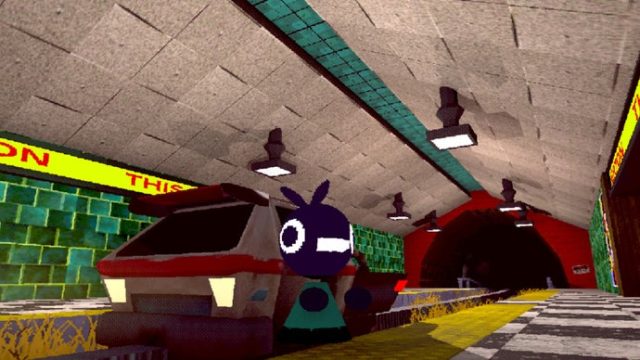
Cinderline invites players into a whimsical, yet slightly eerie world where an anthropomorphic bird travels across a desolate landscape. The main objective? To collect various ingredients needed to prepare the last s'more, a task that blends adventure with quirky humor. Players navigate this unique environment using a small train, stopping at towns to gather items and interact with colorful characters.
In a market saturated with conventional game narratives, Cinderline stands out due to its inventive premise and charming art style. The game's ability to weave humor into its exploration gameplay makes it particularly appealing to fans of both indie games and casual mobile gaming.
Platform Availability
Cinderline is readily available on multiple platforms, ensuring accessibility for a wide range of players. Here’s where you can get it:
- iOS: Available on the Apple App Store.
- Android: Available on the Google Play Store.
- PC: Set to release on platforms like Steam and Epic Games Store.
System Requirements
Before downloading Cinderline, ensure your device meets the following system requirements:
For iOS Users:
- Requires iOS 12.0 or later.
- Compatible with iPhone, iPad, and iPod touch.
- At least 1 GB of free storage space.
For Android Users:
- Requires Android 5.0 (Lollipop) or later.
- 1 GB RAM minimum for optimal performance.
- At least 1 GB of free storage space.
For PC Users:
- Windows 10 or later is recommended.
- At least 4 GB RAM.
- Graphics card capable of DirectX 11.
How to Download Cinderline
Downloading Cinderline is straightforward. Follow these steps to start your adventure:
For iOS Users:
- Open the Apple App Store on your device.
- Search for “Cinderline” in the search bar.
- Tap on the game's icon and select “Get.”
- Once downloaded, open the game and start your journey!
For Android Users:
- Launch the Google Play Store.
- Type “Cinderline” into the search function.
- Select the game from the list and tap “Install.”
- After installation, open the app and get ready to explore!
For PC Users:
- Visit the Steam Store or Epic Games Store.
- Search for “Cinderline.”
- Select the game and follow the prompts to purchase and download.
Why Cinderline Matters Now
In a gaming landscape that is constantly evolving, Cinderline captures the spirit of creativity and exploration. As mobile gaming continues to dominate the market, particularly in regions like Southeast Asia, this game provides a refreshing experience that appeals to a diverse audience. Its quirky storyline and charming visuals are perfect for both casual gamers and avid explorers looking for something unique.
Key Takeaways
- Cinderline is a unique mobile game featuring a bird's adventure for last s'more ingredients.
- Available on iOS, Android, and PC platforms like Steam and Epic Games Store.
- System requirements are modest, catering to a wide range of devices.
- The game promises an engaging experience with humor and creativity.
- Perfect for gamers in Southeast Asia and beyond, looking for fresh content.
Frequently Asked Questions
What devices can I play Cinderline on?
Cinderline is available on iOS and Android devices, as well as on PC through Steam and Epic Games Store.
Is Cinderline free to download?
The game offers a free download option, with in-app purchases available for additional features.
When will Cinderline be released on PC?
Cinderline is expected to launch on PC platforms later this year, adding to its accessibility.
Can I play Cinderline offline?
While some features may require an internet connection, players can enjoy many aspects of Cinderline offline.
What makes Cinderline unique?
The game's blend of adventure, humor, and artistic design sets it apart in the mobile gaming genre.
Latest news
-

The Impact of Mobile
Analyze the impact of mobile gaming on mental heal...
-
Gaming on the Go: Th
Find out the best mobile apps for gamers that can ...
-

Essential Guide to D
Discover how to download mobile games with our det...
-
Your Ultimate Guide
Learn how to download Bombanana! with our expert g...