Explore the New Draft Mode in Marvel Snap: Your Ultimate Guide
Key Takeaways
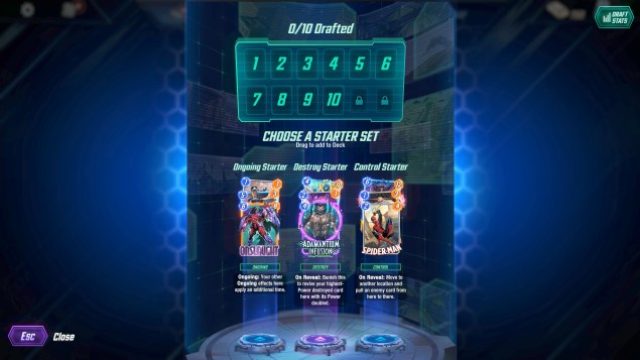
- Marvel Snap's new Draft Mode launches on August 24.
- The game is available on iOS, Android, and PC platforms.
- Players use tickets to participate in limited-time modes.
- Unique twists make Draft Mode different from traditional card games.
- Marvel Snap is gaining popularity in Southeast Asia and Indonesia.
Overview of Marvel Snap
Marvel Snap has quickly gained traction in the mobile gaming sphere, thanks to its innovative gameplay and captivating graphics. Developed by Second Dinner, a team comprising alumni from Blizzard Entertainment, the game merges the thrill of card collecting with fast-paced matches. This engaging title allows players to build decks featuring iconic Marvel characters and unleash strategic moves to dominate their opponents.
Platform Availability
Marvel Snap is designed for a wide range of platforms, making it accessible to a larger audience. Players can enjoy the game on:
- iOS: Downloadable from the Apple App Store.
- Android: Available on Google Play.
- PC: Accessible via platforms like Epic Games Store.
System Requirements
For iOS Devices
To enjoy Marvel Snap on your iOS device, ensure your device meets the following requirements:
- Compatible with iOS 11.0 or later.
- iPhone models: 6S or newer.
- iPad models: iPad Air 2 or newer.
For Android Devices
The requirements for Android devices are as follows:
- Requires Android 6.0 (Marshmallow) or later.
- Devices with a minimum of 2GB RAM are recommended.
For PC
For playing Marvel Snap on PC, the system should meet these specs:
- Windows 10 or later.
- At least 8GB RAM.
- Intel Core i5 or equivalent processor.
How to Download Marvel Snap
Ready to dive into the action? Here's how to download Marvel Snap on your respective platform:
iOS Download Steps
- Open the Apple App Store.
- Search for "Marvel Snap" in the search bar.
- Select the game from the results and tap on the download button.
- Once installed, open the game and start your Marvel journey!
Android Download Steps
- Launch the Google Play Store.
- Type "Marvel Snap" in the search field.
- Find the game, then click the install button.
- After installation, open the app to begin playing.
PC Download Steps
- Go to the Epic Games Store.
- Register or log in to your Epic Games account.
- Search for "Marvel Snap" and find the game.
- Click on the download option to install it on your PC.
Conclusion
Marvel Snap’s introduction of the Draft Mode offers a new layer of strategic depth to the game, captivating both newcomers and seasoned players. With its availability across various platforms and the growing gaming culture in Southeast Asia, such as in Indonesia's cities like Jakarta and Surabaya, now is the perfect time to join the Marvel Snap community. Download the game today and engage in thrilling card battles that are sure to keep you entertained!
Latest news
-

Mobile Gaming and th
Explore how 5G technology is transforming the futu...
-
Mobile Gaming Trends
Explore the exciting trends expected to shape mobi...
-
Navigating Game Down
Discover how to download Horizon Hunters Gathering...
-
Your Ultimate Guide
Discover how to download the latest Nintendo Switc...