Unravel the Puzzles of Pight: A Guide to Downloading and Playing
Key Takeaways
- Pight is a unique 2D puzzle game inspired by Minecraft's redstone mechanics.
- Available on popular platforms including Steam and the Apple App Store.
- Minimal system requirements make it accessible for most players.
- Easy-to-follow installation steps ensure a smooth gaming experience.
- Perfect for puzzle enthusiasts looking for a fresh challenge.
Overview of Pight
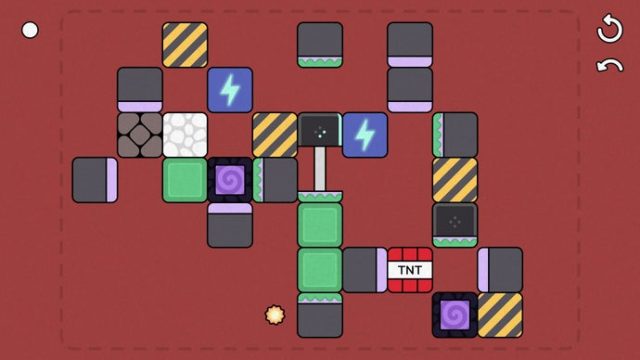
Pight brings a refreshing twist to the puzzle genre with its ingenious gameplay mechanics inspired by redstone from Minecraft. Players are tasked with maneuvering a lightbulb block onto a power source while using various interactive elements like pistons, portals, and blocks of electricity. The game is designed to challenge your problem-solving skills and creativity, offering a relaxing yet engaging experience.
The simplicity of Pight's graphics and its affordable pricing make it an appealing choice for gamers seeking a break from more intense titles. The game effortlessly combines elements of strategy and logic, allowing players to explore and create while solving intricate puzzles.
Platform Availability
Pight is currently available on multiple platforms, ensuring that players can enjoy the game regardless of their preferred gaming system. Here’s where you can find it:
- Steam: Available for Windows and Mac users. Visit the Steam Store to purchase and download.
- Apple App Store: iOS users can download Pight from the Apple App Store.
- Google Play Store: Android users can access Pight through the Google Play Store.
System Requirements
Before diving into your gameplay, check out the system requirements for Pight to ensure optimal performance:
- Windows: Windows 7 or higher, 2 GB RAM, Intel Core i3 or equivalent.
- Mac: macOS Sierra or later, 2 GB RAM, compatible graphics card.
- iOS: Requires iOS 11.0 or later, compatible with iPhone, iPad, and iPod touch.
- Android: Requires Android 5.0 and up, with at least 2 GB of RAM.
How to Download Pight
Downloading Pight is a straightforward process, whether you’re on a PC or mobile device. Follow these simple steps:
For PC Users (Steam)
- Visit the Steam Store.
- Search for "Pight" in the store's search bar.
- Select the game from the results and click on the "Add to Cart" button.
- Proceed to checkout and complete your purchase.
- Once purchased, the game will be added to your library for download.
For Mac Users
- Open the Steam Store.
- Search for "Pight" and select it.
- Add it to your cart and complete the payment process.
- Download the game from your library after purchase.
For iOS Users
- Open the Apple App Store on your device.
- Search for "Pight" using the search function.
- Tap on the download button to install it on your device.
For Android Users
- Open the Google Play Store on your device.
- Search for "Pight".
- Click on the install button to download the game.
Conclusion
Pight is a delightful addition to the world of puzzle gaming, enticing players with its engaging mechanics and charming visuals. Whether you’re navigating the challenges on a PC or a mobile device, the game offers a compelling experience that caters to players of all skill levels. With its availability across various platforms, now is the perfect time to download and dive into the captivating puzzles of Pight!
Latest news
-

Ultimate Guide to Mo
Learn everything you need to know about streaming ...
-
Mobile Game Localiza
Learn why localization is crucial for mobile games...
-
Exploring the Future
Delve into the future of iOS gaming and discover u...
-
Game: FC 26 Season 1
Discover expert insights on game. The final showdo...