Unlock Spider-Man's Web Shooters in Fortnite: Your Complete Guide
Key Takeaways
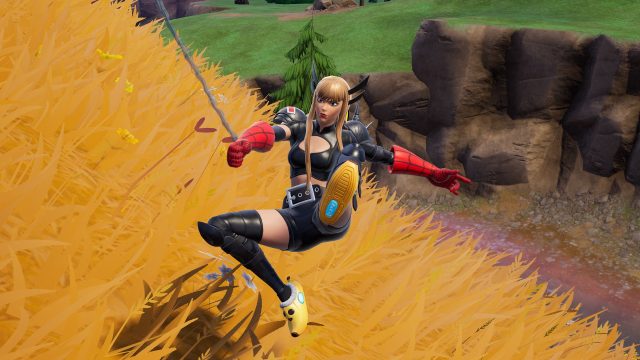
- Spider-Man's web shooters return in Fortnite Chapter 7 Season 3.
- Locate designated areas on the map to find the web shooters.
- Completing challenges may reward players with additional features.
- Mobile versions are available for iOS and Android players.
- This feature enhances player mobility and gameplay strategy.
Overview of Spider-Man's Web Shooters
Spider-Man's web shooters are a dynamic gameplay feature in Fortnite Chapter 7 Season 3, allowing players to traverse the map with ease. This innovative tool not only boosts mobility but also introduces unique gameplay mechanics like swinging and climbing. Given the rising popularity of superhero-themed content in gaming, this feature is especially timely for players looking to enhance their in-game experience.
Platform Availability
Spider-Man's web shooters are available across multiple platforms, ensuring that players can enjoy this exciting feature on their preferred device. Fortnite is officially accessible on:
- PC (Windows and Mac)
- PlayStation 4 and 5
- Xbox One and Series X/S
- Nintendo Switch
- iOS and Android via the Epic Games Store
System Requirements
Before diving into Fortnite Chapter 7 Season 3 and utilizing Spider-Man's web shooters, ensure that your system meets the following requirements:
PC Requirements
- Minimum: Intel Core i3, 4GB RAM, Nvidia GTX 660 or equivalent, 15GB disk space
- Recommended: Intel Core i5, 8GB RAM, Nvidia GTX 970 or equivalent, 20GB disk space
Mobile Requirements
- iOS: Compatible with iPhone 6S and later models, iOS 11 or higher
- Android: Requires Android 6.0 or higher, with at least 4GB RAM and a Vulkan-compatible GPU
How to Download
To access Spider-Man's web shooters in Fortnite Chapter 7 Season 3, you'll need to download Fortnite first. Follow these steps for a smooth installation:
For PC Users
- Visit the Epic Games Store.
- Click on the download button and install the Epic Games Launcher.
- Once installed, open the launcher and search for Fortnite.
- Click on the "Install" button and wait for the download to complete.
For Console Users
- Open the PlayStation Store or Xbox Store on your console.
- Search for Fortnite in the store.
- Select the game and click the "Download" or "Install" option.
For Mobile Users
- For iOS, go to the Apple App Store.
- For Android, access the Google Play Store.
- Search for Fortnite and tap on "Download".
Conclusion
Spider-Man's web shooters in Fortnite Chapter 7 Season 3 are an exciting addition to the game, enhancing player mobility and engagement. With easy access on various platforms, players from Southeast Asia, including Indonesia, can join in on the action. Follow the installation steps to get started and experience the thrill of swinging through Fortnite landscapes. Don't miss out on this opportunity to elevate your gameplay!
Latest news
-

Connecting Gamers: T
Uncover the best social features in mobile games t...
-
The Rise of Subscrip
Explore the rise of subscription services in mobil...
-
The Best Mobile Game
Check out the best mobile game remakes that have b...
-
Exploring the Cross-
Dive into the world of cross-platform gaming. Lear...