Unlock the Skies: Your Guide to Downloading Wild Blue Skies
Overview of Wild Blue Skies
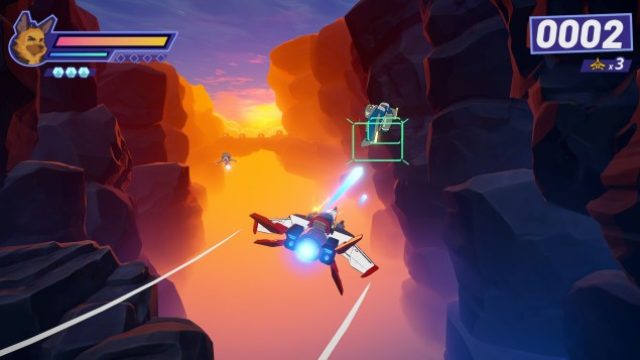
Wild Blue Skies pays tribute to the iconic Star Fox series by offering a nostalgic yet fresh experience. This indie game mirrors beloved mechanics, including alternate paths, all-range mode stages, and a compelling storyline featuring rival pilots. For players looking to relive those exhilarating space battles, Wild Blue Skies delivers an engaging journey filled with challenges and excitement.
Platform Availability
Wild Blue Skies is accessible on various platforms, making it easy for gamers to jump in regardless of their device preferences. Here are the available platforms:
- PC: Available on Steam and Epic Games Store.
- Consoles: PlayStation and Xbox versions will be released in the near future.
- Nintendo Switch: Coming soon to the Nintendo eShop.
- Mobile: Currently, there are no announced mobile versions.
System Requirements
To ensure an optimal gaming experience with Wild Blue Skies, check the following system requirements:
Minimum Requirements
- OS: Windows 10
- Processor: Intel Core i3 or equivalent
- Memory: 4 GB RAM
- Graphics: NVIDIA GTX 660 or AMD Radeon HD 7870
- DirectX: Version 11
- Storage: 10 GB available space
Recommended Requirements
- OS: Windows 10
- Processor: Intel Core i5 or equivalent
- Memory: 8 GB RAM
- Graphics: NVIDIA GTX 970 or AMD Radeon RX 580
- DirectX: Version 12
- Storage: 10 GB available space
How to Download Wild Blue Skies
Ready to take to the skies? Here’s a step-by-step guide to download and install Wild Blue Skies on your chosen platform.
For PC (Steam)
- Open the Steam client or visit the Steam Store website.
- Search for “Wild Blue Skies” using the search bar.
- Click on the game title and select the Add to Cart option.
- Proceed to checkout and complete your purchase.
- Once the download finishes, install the game and launch it from your library.
For Epic Games Store
- Open the Epic Games Launcher or navigate to the Epic Games Store website.
- Search for “Wild Blue Skies.”
- Add it to your library by clicking Get and follow the purchase process.
- After downloading, install the game and start your adventure!
For PlayStation and Xbox
As of now, Wild Blue Skies has not launched on consoles, but you can keep an eye on the PlayStation Store and Xbox Store for future availability.
For Nintendo Switch
The game will soon be available on the Nintendo eShop. Make sure to check the Nintendo eShop frequently for updates.
Key Takeaways
- Wild Blue Skies mimics classic Star Fox gameplay.
- Available on PC via Steam and Epic Games Store.
- System requirements vary from minimum to recommended specs.
- Console versions are anticipated, check official stores for updates.
- Ideal for retro gaming fans and new players alike.
Frequently Asked Questions
Is Wild Blue Skies a free game?
No, Wild Blue Skies is a paid game available for purchase on various platforms.
When will Wild Blue Skies be available on consoles?
The specific release dates for consoles are not confirmed yet; keep an eye on the official game pages.
Can I play Wild Blue Skies on my mobile device?
Currently, there are no mobile versions announced for Wild Blue Skies.
What are the differences between the platforms?
The gameplay experience remains consistent across platforms, with potential variations in graphics quality based on system specifications.
Are there any bonuses for early purchases?
No specific bonuses have been announced; however, stay updated for any promotional offers from official stores.
Latest news
-

The Rise of Indie Ga
Explore the rise of indie games on mobile platform...
-

Essential Download G
Discover how to download popular mobile games on i...
-
Game: 'That Chat Is
Discover expert insights on game. The iOS and cros...
-
Game: Limited Run An
Discover expert insights on game. The iOS and cros...