Transform Your Xbox Game Library: The Latest Disc-to-Digital Feature
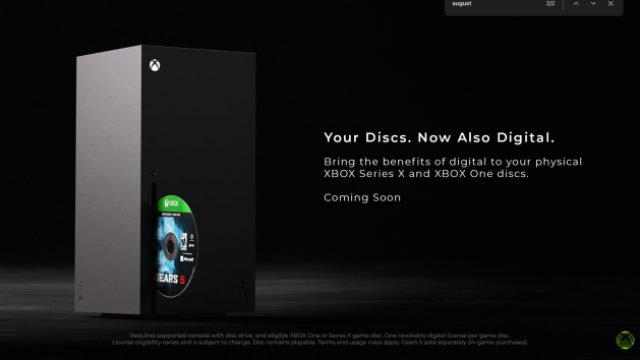
Key Takeaways
- Launch Xbox games digitally using physical disc support.
- Available for Xbox One and Series X consoles.
- Experience benefits like Xbox Play Anywhere with digital entitlements.
- Program enhances gaming accessibility for Southeast Asian markets.
- Officially announced by Microsoft, making it reliable and user-friendly.
Understanding the Disc-to-Digital Feature
Microsoft has recently unveiled a groundbreaking program that transforms the way players interact with their physical game collections. This innovative disc-to-digital feature allows users to convert their physical Xbox game discs into digital versions, thereby streamlining their gaming experience. Whether you own Xbox One or Xbox Series X, this program is designed to increase the convenience and flexibility of your gaming library.
Why This Matters Now
In today's fast-paced digital landscape, gamers are increasingly seeking ways to optimize their gaming setups. With the rise of digital downloads, the ability to access games without physical barriers has become essential. By digitizing your physical game discs, you can enjoy seamless access to your favorite Xbox titles anytime, anywhere.
How to Download and Digitize Your Games
Ready to take advantage of this new feature? Here's a simple step-by-step guide to help you get started:
Step 1: Prepare Your Xbox Console
Ensure your Xbox One or Xbox Series X is updated to the latest system software. Head to the settings menu and check for updates to optimize your gaming experience.
Step 2: Insert Your Game Disc
Place the physical game disc you wish to digitize into the console. The system will recognize the disc and initiate the conversion process.
Step 3: Claim Your Digital Entitlement
Upon insertion, your console will prompt you to claim a digital entitlement. Follow the on-screen instructions to complete this step, allowing you to access the game digitally moving forward.
Step 4: Download Your Game
Once the entitlement is claimed, navigate to your game library. You will find the game available for download. Click on the download option to start enjoying the game without needing the physical disc.
Benefits of Going Digital
Transitioning to a digital library has several advantages:
- Instant Access: Say goodbye to swapping discs. Your games are just a click away.
- Space Saving: Free up physical space while keeping your entire library accessible.
- Enhanced Features: Utilize Xbox Play Anywhere and other digital benefits such as cloud saves.
Platform Availability
The disc-to-digital feature is specifically designed for Xbox One and Xbox Series X consoles. Players in regions like Southeast Asia, including Indonesia's bustling markets such as Jakarta and Surabaya, can benefit from this feature to enhance their gaming experience. Being able to easily digitize games means more players can access their favorite titles without the hassle of physical media.
Conclusion
Microsoft's new disc-to-digital program is a game-changer for Xbox users, simplifying the way players access and manage their game libraries. By converting physical titles into digital entitlements, gamers not only enhance their experience but also gain access to modern gaming features that elevate their playtime. Don't miss out on this opportunity to streamline your gaming setup today!
Latest news
-

A Complete Guide to
Discover how to download Fable on various platform...
-
Unlocking Lofsong: Y
Discover how to download Lofsong on PS5 and explor...
-

Unlock Your Game: A
Discover the ultimate guide to downloading games o...
-

Your Ultimate Guide
Explore how to download Crimson Desert on various ...